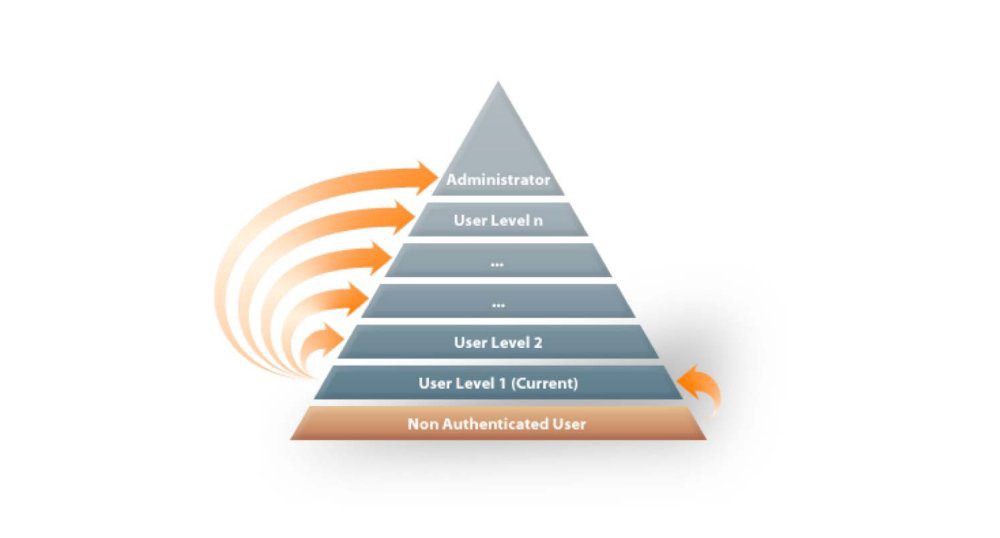
What does Privilege Escalation mean?
At it’s core, Privilege Escalation usually involves going from a lower permission to a higher permission. More technically, it’s the exploitation of a vulnerability, design flaw or configuration oversight in an operating system or application to gain unauthorized access to resources that are usually restricted from the users.
Why is it important?
Rarely when doing a CTF or real-world penetration test, will you be able to gain a foothold ( initial access ) that affords you admin role access. PE is important cause it help you gain to system admin levels. This allow you to do many things, including:
- Reset password.
- Bypass access control to compromise protected data.
- Edit software configurations.
- Enable persistence, so you can access the machine again later.
- Change privilege of users.
As well as any other administrator or super user commands that you desire
Privilege Tree:

There are two main PE types:
Horizontal PE: This is where you expand your reach over the compromised system by taking over a different user who is on the same PE level as you. For instance, a normal user hijacking another normal user ( rather than elevating to root user ). This allows you to inherit whatever files and access that user has. This can be used, for instance, to gain access to another normal privilege user, that happen to have an SUID file attached to their home directory which can then be used to get root user access.
Vertical PE (privilege elevation): This is where you attempt to gain higher privilege or access, with exist account that you have already promised. For the local PE attacks this might mean hijacking an account with admin or root privilege.
TAKE EXAMPLE
when you are in the machine, but you are only normal user level. You can not do anything with this user, you want to get root user. Let’s follow some below step:
Enumeration
To enum the security hold in linux system. you can search on the internet. there are a lots of tool and github code custom. But the best one with me is LinEnum.
What is LinEnum?
LinEnum is a simple bash script that performs common commands related to PE, saving time and allowing more effort to be put toward getting root. It is important to understand what commands LinEnum executes, so that you are able to manually enumerate PE vulnerabilities in a situation where you’re unable to use LinEnum or other like scripts
Where to get LinEnum?
You can download a local copy of LinEnum from:
https://github.com/rebootuser/LinEnum/blob/master/LinEnum.sh
It’s worth keeping this somewhere you’ll remember, because LinEnum is an invaluable tool.
How do I get LinEnum on the target machine?
There are two ways to get LinEnum on the target machine. The first way, is to go to the directory that you have your local copy of LinEnum stored in, and start a Python web server using “python -m SimpleHTTPServer 8000” [1]. Then using “wget” on the target machine, and your local IP, you can grab the file from your local machine [2]. Then make the file executable using the command “chmod +x FILENAME.sh”.
image–
Other Methods
In case you’re unable to transport the file, you can also, if you have sufficient permissions, copy the raw LinEnum code from your local machine [1] and paste it into a new file on the target, using Vi or Nano [2]. Once you’ve done this, you can save the file with the “.sh” extension. Then make the file executable using the command “chmod +x FILENAME.sh”. You now have now made your own executable copy of the LinEnum script on the target machine!
–iamge
Running LinEnum
LinEnum can be run the same way you run any bash script, go to the directory where LinEnum is and run the command “./LinEnum.sh”.
Understanding LinEnum Output
The LinEnum output is broken down into different sections, these are the main sections that we will focus on:
Kernel Kernel information is shown here. There is most likely a kernel exploit available for this machine.
Can we read/write sensitive files: The world-writable files are shown below. These are the files that any authenticated user can read and write to. By looking at the permissions of these sensitive files, we can see where there is misconfiguration that allows users who shouldn’t usually be able to, to be able to write to sensitive files.
SUID Files: The output for SUID files is shown here. There are a few interesting items that we will definitely look into as a way to escalate privileges. SUID (Set owner User ID up on execution) is a special type of file permissions given to a file. It allows the file to run with permissions of whoever the owner is. If this is root, it runs with root permissions. It can allow us to escalate privileges.
Crontab Contents: The scheduled cron jobs are shown below. Cron is used to schedule commands at a specific time. These scheduled commands or tasks are known as “cron jobs”. Related to this is the crontab command which creates a crontab file containing commands and instructions for the cron daemon to execute. There is certainly enough information to warrant attempting to exploit Cronjobs here


 fallinlove